Enable Sentria (bring your own AI)
Sentria is AI built into your mailbox. With bring-your-own-AI (BYOAI), email content goes only to your local Ollama URL — not to a cloud AI service. Use this after Ollama is installed and running.
Open the Meet Sentria window
When you open scomm.ai with Ollama available, the Meet Sentria window introduces the assistant: summarize threads, draft replies, and manage your inbox through your local Ollama server.
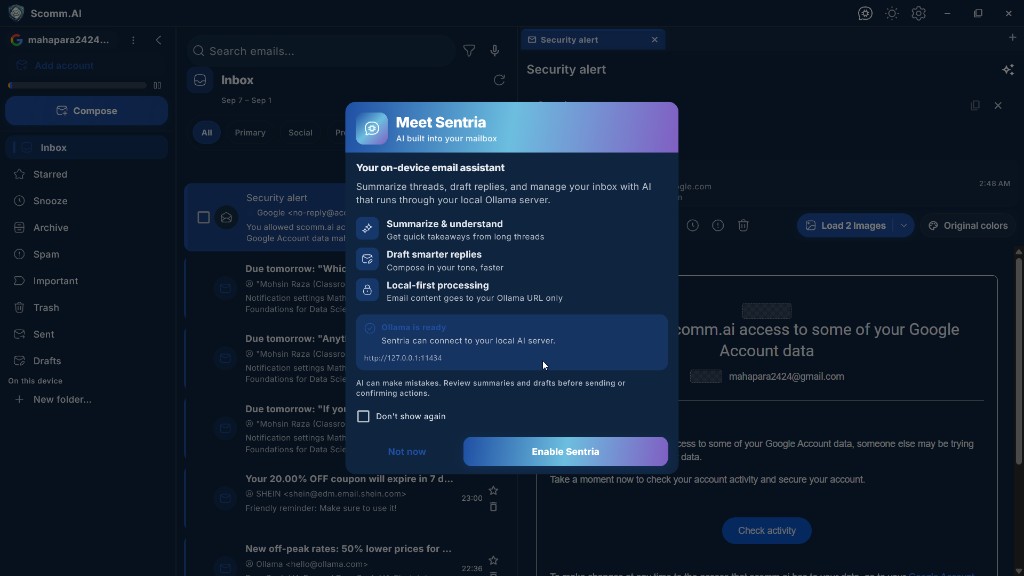
Meet Sentria — AI built into your mailbox. Review local-first status
Confirm the status box says Ollama is ready and lists your connection URL (usually http://127.0.0.1:11434). Local-first processing means email content is sent only to that URL on your device.
Enable Sentria
Choose Enable Sentria. You can tick Don’t show again if you do not want the intro window next time. Choose Not now if you prefer to enable it later from Settings.
Use the Sentria menu
With Sentria enabled, open the Sentria menu from the mailbox. You can Summarize thread, Extract tasks, Draft reply, or Open Sentria chat. Use ↑ and ↓ to move, Enter to choose, and Esc to close.
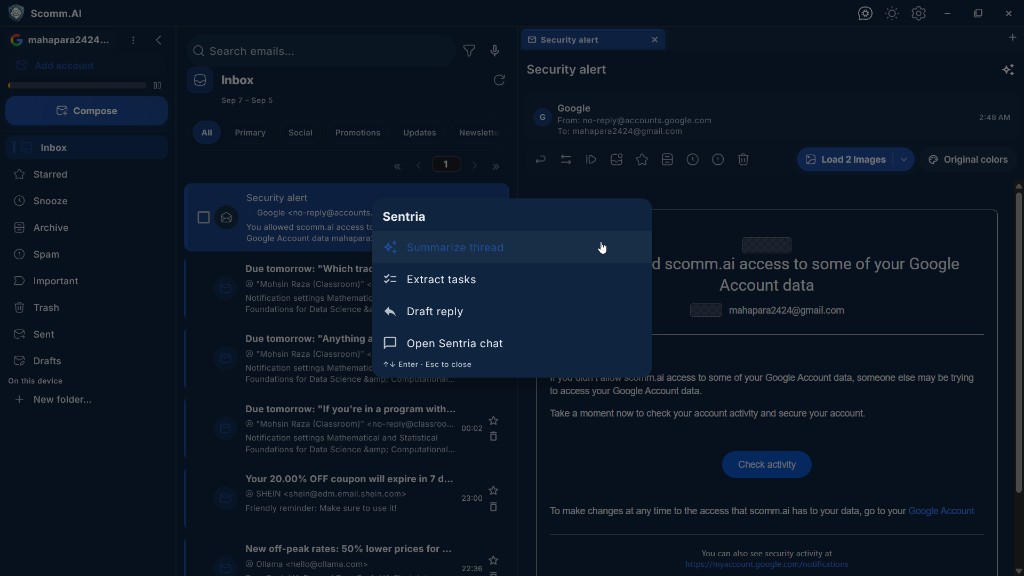
Sentria actions: summarize, extract tasks, draft, or open chat. Review before you send
AI can make mistakes. Always review summaries, extracted tasks, and drafts before you send a message or confirm an action.